
My Real-World Experience with Google Site Kit
Google Site Kit: What It Does and How We Use It
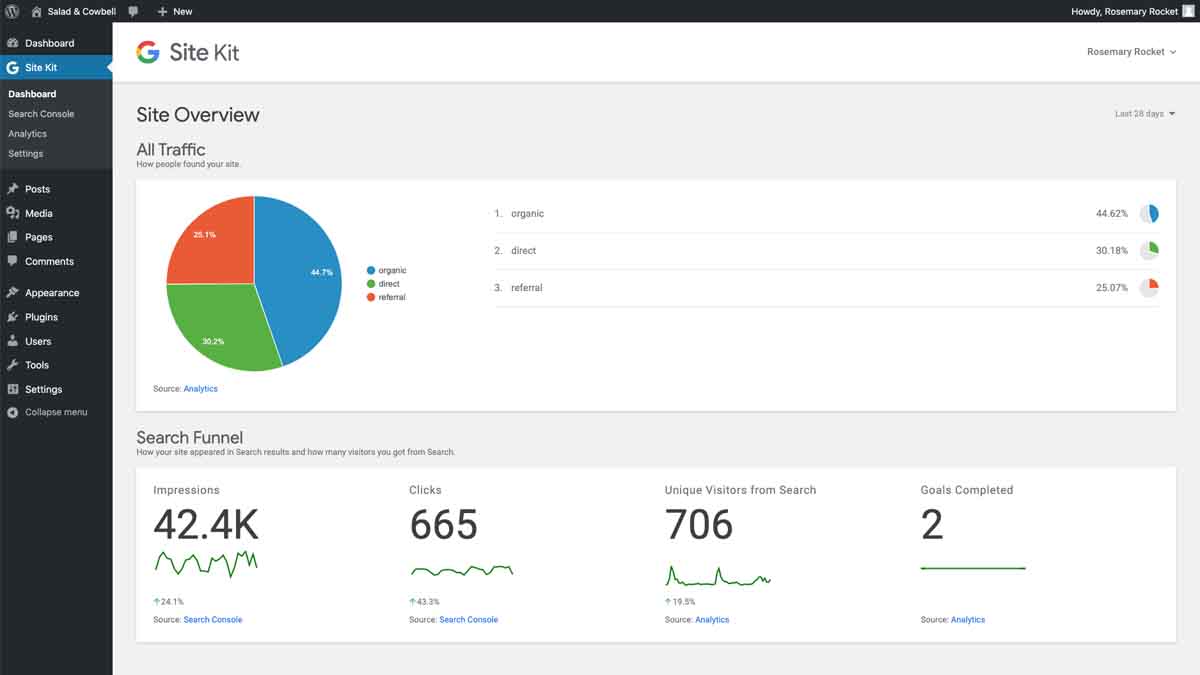
Site Kit is Google’s own WordPress plugin. It pulls Search Console, Analytics, PageSpeed Insights and AdSense data into your WordPress dashboard, so you can see how a site is performing without logging into four separate tools.
We install it on most client sites. Here’s what it’s good for, and where it isn’t.
What it does well
One dashboard instead of four. For a business owner who wants to know whether their website is working, Site Kit answers that question in one place. That matters more than it sounds. Most clients don’t want to learn Google Analytics 4, they want to know if enquiries are coming in and where from.
It’s built by Google. No third-party middleman, no risk of the plugin being abandoned, and the authentication process is straightforward.
PageSpeed Insights built in. Mobile performance problems are easy to miss when you’re reviewing a site on a desktop. Having PageSpeed data sitting in the same dashboard makes those problems visible before they cost you rankings.
Search Console data where you’ll actually look at it. Queries, impressions and click-through rates surfaced inside WordPress get checked far more often than data sitting behind a separate login.
What to watch out for
Connect Search Console first. Site Kit’s setup expects Search Console to be verified before the other services will behave properly. Skipping that step is the most common reason an installation misbehaves.
It doesn’t track what you haven’t set up. Site Kit reports what Analytics is measuring. If phone-click tracking or form-submission events were never configured, Site Kit will happily show you a complete-looking dashboard that’s missing your most important conversions. Check what’s actually being tracked before trusting the numbers.
Google moves things. Interface changes and migrations (the GA4 transition being the obvious one) mean occasional reconfiguration. It’s the cost of using a tool that’s actively developed.
It’s a reporting tool, not an analysis tool. Site Kit shows you what happened. Working out why, and what to do about it, is still the job.
How we set it up
- Verify Search Console first, before installing.
- Connect Analytics 4, then PageSpeed Insights.
- Configure event tracking for the things that actually matter to the business: phone clicks, form submissions, quote requests. This is the step most installations skip.
- Set the dashboard date ranges and metrics to what the client will genuinely use.
Is it worth installing?
For most WordPress sites, yes. It’s free, it’s official, and it puts the numbers in front of the people who need them. It won’t replace proper analysis, and it won’t fix tracking that was never set up correctly. But as a way to make a website’s performance visible to the person who owns it, there’s nothing better for WordPress.
If you’d like help setting up analytics properly, or working out what your numbers are actually telling you, get in touch.
Read more → Google Site Kit | Read → Reviews | Download → Google